
Getting to the top of Google can make a big difference in how much organic traffic your website receives.
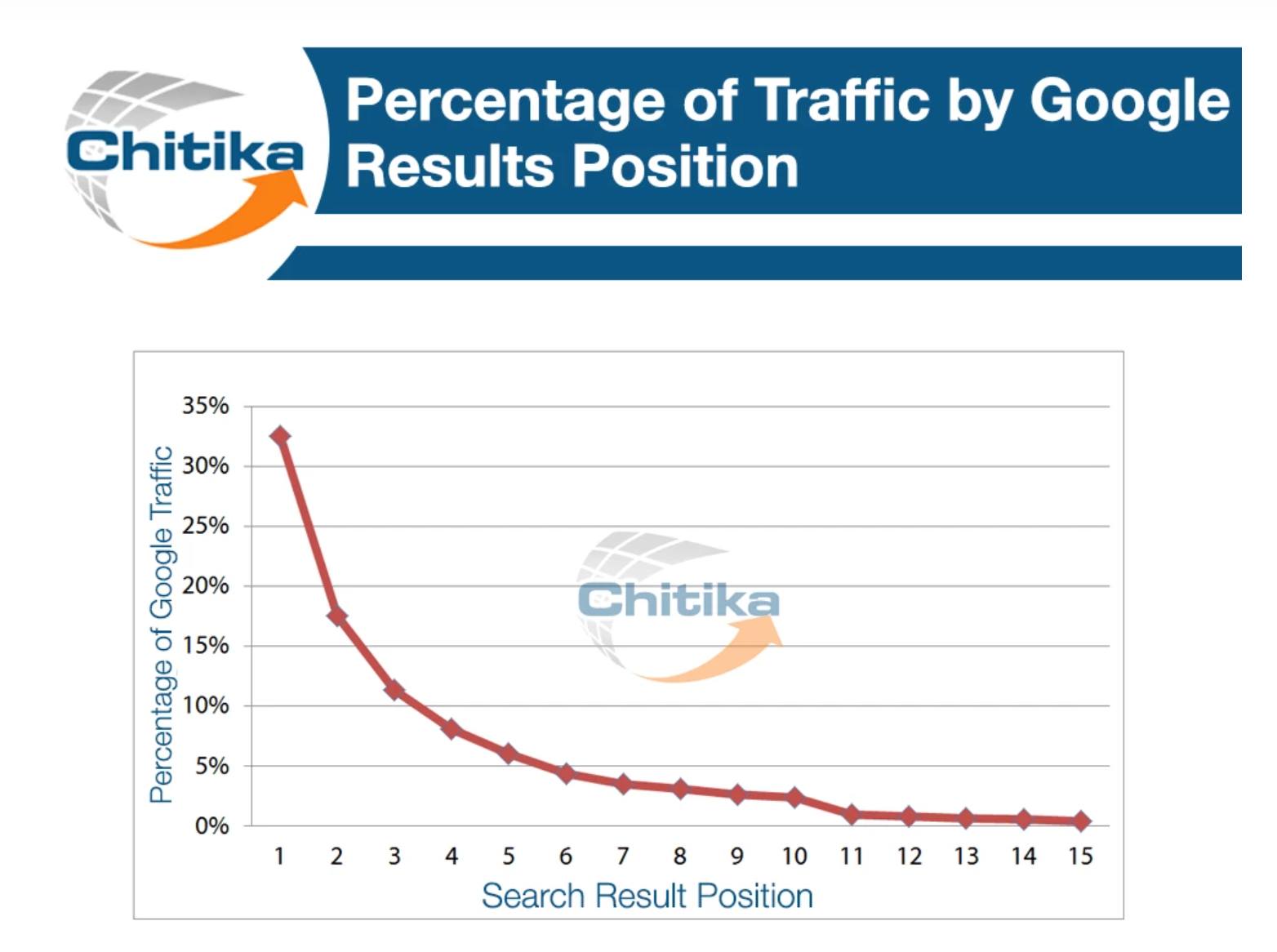
One frequently cited study found that the #1 organic search result received approximately 34% of the traffic, with the percentage dropping significantly as rankings moved farther down the page.
But there's more to understand about Google rankings than one percentage.
Your website doesn't have just one Google ranking.
Individual webpages can appear for many different searches, and each search can have a different ranking position.
More importantly, you want to know:
- What searches is your website appearing for?
- Which webpages are showing for those searches?
- Where are those pages ranking?
- Are people clicking on them?
- Are you showing up for searches that could actually bring you customers?
This is where understanding your Google rankings and using Google Search Console can become extremely useful.
What Does Your Google Ranking Position Mean?
When someone searches Google, Google decides which results to show and in what order.
If one of your webpages appears as the third organic result, you're ranking around position three for that particular search.
But that same page might appear in position eight for another search and position 20 for something else.
For example, a business consultant's website could potentially appear for searches such as:
- business growth consultant
- small business growth consultant
- business strategy consultant
- business growth consulting services
The website could appear in a completely different position for each search.
That's why asking: “Where does my website rank on Google?”
doesn't really give you the whole picture.
A better question is: “What searches are my webpages appearing for, and where are they ranking for those searches?”
Why Does Ranking Higher Matter?
Think about the last time you searched Google for a product, service or answer to a question.
How far did you scroll?
Most people don't look through dozens of search results before deciding what to click.
Pages appearing toward the top of Google's organic results generally have a better opportunity to be seen and clicked than pages appearing farther down.
The study referenced in this article found:
- Position #1: 34.35%
- Position #2: 16.96%
- Position #3: 11.42%
By position #10, the percentage had dropped to 2.71%.
That's a substantial difference. But I don't want you to look at those numbers and think: “If I'm not #1, my SEO isn't working.” That's not the lesson.
- Moving an important page from position 20 to position 10 can be progress.
- Moving from position 10 to position 5 can put you in front of more potential customers.
- Moving from position 5 to position 2 could create another opportunity for additional traffic.
SEO isn't only about getting a #1 ranking. It's also about improving the visibility of the pages and searches that are valuable to your business.
Does the #1 Result Always Get 34% of the Traffic?
No. The 34% figure comes from the study referenced in this article. It shouldn't be treated as a rule for every Google search.
Google's search results have changed significantly over the years.
Depending on what you search, you might see:
- Paid ads
- Google Maps results
- Images
- Videos
- Shopping results
- Featured information
- AI generated answers
and traditional organic search results
The search itself can also affect how people interact with the results. So don't get stuck on one percentage.
The larger point is much more useful: Your position in Google's search results can have a significant impact on how visible your webpage is and how many opportunities you have to earn clicks.
You Don't Have to Guess What You're Ranking For
One of the best things you can do is stop guessing. Google provides a free tool called Google Search Console that gives website owners information directly from Google about how their websites are performing in search.
In simple terms, Search Console lets you see how Google is finding and showing your website.
And you don't need to be an SEO professional to learn something useful from it.
One of the most valuable areas is the information about your website's search performance.
You'll see terms such as queries, impressions, clicks and average position.
Here's what they mean.
Queries
A query is something a person searched on Google that caused one of your webpages to appear in the search results.
This is incredibly useful.
You might optimize a page around one keyword and later discover that Google is showing that page for several other related searches you hadn't considered.
Those queries can help you understand how Google interprets your content and how people are actually searching for the products, services or information you provide.
Impressions
An impression generally means your webpage appeared in a Google search result.
For example, if one of your pages received 1,000 impressions, it was shown in search results approximately 1,000 times under Google's reporting rules.
Someone doesn't have to click your result for you to receive an impression.
That's why impressions can help you spot pages that are being seen but aren't necessarily receiving many clicks yet.
Clicks
Clicks are exactly what they sound like. Someone saw your result on Google and clicked through to your website.
If you're receiving a lot of impressions but very few clicks, that's something worth investigating.
- Where are you ranking?
- Does your title make sense for the search?
- Does your search result clearly communicate what the page offers?
- Are other results more closely aligned with what the person appears to want?
There can be several reasons for the difference.
Average Position
Average position gives you information about where your result appeared in Google for the searches where it was shown.
Remember, this is an average, and rankings can change.
Don't treat it as if your page permanently occupies one exact spot on Google.
Instead, use it as another piece of information to understand how visible your pages are for searches that matter to your business.
Look Beyond Your Overall Website Numbers
This is where Search Console gets even more useful.
Don't only look at the total number of clicks or impressions for your entire website.
Start looking at individual queries and pages.
You may discover that a page you published six months ago is suddenly getting thousands of impressions.
Or maybe an important service page is appearing for a highly relevant search but sitting around position 11.
Maybe another page is ranking in position 5 and getting impressions but very few clicks.
Those are opportunities to investigate.
For example, imagine you discover:
- Query: small business growth consultant
- Impressions: 800
- Clicks: 15
- Average position: 9
Don't immediately start changing everything.
First, look at the query. Is this a search that's relevant to your business?
If it is, look at the page Google is showing. Then search the query yourself and study the results.
Ranking for the Right Search Is More Important Than Ranking for Any Search
Getting to position #1 sounds great.
But #1 for what? That's the question.
Imagine you're a business consultant. You could potentially get traffic from someone searching:
- business consultant salary
But that person may be researching a career in business consulting.
Now compare that with: small business growth consultant
That search could potentially come from a business owner looking for the type of help you provide.
The second keyword might have fewer searches, but it could be far more relevant to your business. That's why I don't recommend choosing keywords based solely on search volume. More traffic isn't automatically better traffic.
You want visibility for searches that align with your products, services and the people you're trying to reach.
Check the Search Intent Before Optimizing
Once you find an interesting query in Search Console or through keyword research, go to Google and search it yourself. Look at what's ranking.
Are the results mostly:
- Service pages?
- Product pages?
- Blog posts?
- Videos?
- Listicles?
- Comparison articles?
- Local businesses?
Google's results can give you clues about what someone using that search is likely looking for.
For example, if you're trying to rank a service page but Google is primarily showing educational articles, your service page may not match the intent behind that particular search.
If Google is primarily showing service pages from businesses like yours, that's a different situation.
This is called search intent, and understanding it can help you decide which keywords belong with which pages.
Look for Pages That Are Already Getting Close
One of my favorite ways to use Search Console is to find opportunities with pages that Google is already showing.
You don't always need to create something new.
You might find a page ranking around positions:
- 5
- 8
- 11
- 15
- 20
for a search that's highly relevant to your business.
Google already knows about the page and is already showing it for that query.
Now you can investigate whether improving the existing page could help.
Ask yourself: Does the page match what people searching this keyword want?
- Is the primary topic clear?
- Is the page properly optimized?
- Does it thoroughly explain the product or service?
- Could the title tag be improved?
- Could the page answer additional questions?
- Do other relevant pages on your website link to it?
Sometimes the opportunity isn't publishing another article. It may be improving something you've already created.
One Page Can Rank for Many Searches
Another thing Search Console can teach you is that you don't necessarily need a separate page for every keyword.
A useful, well optimized webpage can potentially appear for many related searches.
Let's say you created a page targeting business growth consultant.
Search Console might eventually show that Google is also displaying the page for related searches around:
- business growth consulting
- small business growth consultant
- business growth consulting services
and other relevant variations.
You don't automatically need to create separate pages for each one.
If the searches have similar intent and relate to the same service, strengthening one useful page may make more sense than creating several nearly identical pages.
What Should You Do With Your Search Console Data?
Don't open Search Console, stare at a bunch of numbers and close it. Use the information.
Start by looking at your queries.
- Which searches are getting the most impressions?
- Which are getting clicks?
- Which searches are directly related to something you sell?
- Where are you already ranking relatively well?
- Which pages are Google showing?
Then investigate. Take an important query and search it on Google.
- Look at the results.
- Look at your page.
Compare the search intent with what your page actually provides. Then decide if there is something worth improving.
Over time, this gives you a much better way to make SEO decisions than simply publishing more content and hoping something ranks.
Don't Obsess Over One Ranking
SEO tools can be incredibly helpful, and I use them myself. But I don't want business owners obsessing over one ranking number.
Your pages can rank for many searches. Rankings can move. Search results can vary. Google can also display many different features alongside traditional organic results.
Instead, pay attention to the bigger picture:
- What searches are you appearing for?
- Are those searches relevant to your business?
- Are your impressions increasing?
- Are people clicking?
- Which pages are gaining visibility?
- Where do you have opportunities to improve?
And most importantly: Is your organic traffic helping the right people discover your business?
Getting to the top of Google can be extremely valuable. But the goal isn't simply to say “I'm #1 on Google.”
The goal is to become more visible when the people you want to reach are searching for the products, services and information you provide.

Not Seeing Any Google Traffic Yet?
If you're checking your website traffic and aren't seeing much coming from Google, there's another question to answer first: is your website actually showing up in Google Search?
I put together a simple walkthrough that shows you how to check whether Google has indexed your website and individual pages, plus what to look at inside Google Search Console.
Read: Is Your Website Actually on Google? Here's How to Check
Want Help Applying This to Your Business?
Mastering P.O.P. is $249/month for ongoing, hands on digital marketing and SEO support.
We work on your actual business together, from your website and SEO to content, email marketing, lead generation, AI, automations, and conversions.
You'll have 365 day access to me through our private community, where you can ask questions, get feedback, and get help while you're actually doing the work. We also meet live on Zoom each week to review, troubleshoot, and work through your marketing together.
Think about what one new customer is worth to your business. If one customer is worth $249 or more, the bigger expense may be the leads and sales you're already losing because your marketing isn't working the way it should.
You don't need another course. You need someone helping you apply the right marketing to your business.